The fastest way to capture high-quality event leads is mobile-first QR capture with 3–5 essential form fields, real-time CRM sync, and transparent consent. Everything else is optimization. Limiting initial fields to 3–5 essentials and pairing them with an immediate value exchange is the single highest-leverage move a marketing team can make before doors open.
Quick-action checklist for field teams:
- Deploy smart QR codes with UTM parameters and a single redirect destination
- Offer immediate value on the landing page (discount, resource, or exclusive content)
- Map every form field to a CRM field before the event goes live
- Sync leads in real time, or within 24 hours at the absolute latest
- Assign one person to own live data quality on event day
- Send the first follow-up within 24 hours while brand recall is highest
Pro Tip: Test your QR-to-CRM pipeline end-to-end 48 hours before the event. A broken redirect or a mis-mapped field will silently kill your capture rate.
Table of Contents
- What should you do before the event to protect data quality?
- How should you design mobile forms that attendees actually complete?
- What QR code practices actually raise scan rates at outdoor activations?
- How do you handle consent and privacy without killing opt-in rates?
- How do you map CRM fields and keep data clean across channels?
- How do you trace a QR scan on a mobile billboard back to revenue?
- What QA tests must you run before and during the event?
- How do you turn scans into sales-qualified leads after the event?
- Beacon-ads in action: end-to-end capture, sync, and attribution
- Key Takeaways
- Why the data window at events is shorter than most teams think
- Beacon-ads runs the full capture stack for mobile OOH campaigns
- Useful sources and further reading
What should you do before the event to protect data quality?
Data governance defined before registration prevents the fragmentation that breaks CRM workflows after the event. Run through this ten-point checklist with timing and owner assignments:
- Define naming conventions (campaign ID, touchpoint, creative) and document them in a shared spec sheet. Owner: marketing ops. Due: two weeks out.
- Standardize job-title and company fields using a controlled vocabulary or autocomplete list.
- Set retention and dedupe rules — decide how long records are kept and how duplicates from badge scans, QR, and manual entry are merged.
- Configure CRM field mapping and run a test submission to confirm data lands in the right fields.
- Build and test QR destinations — confirm redirect chains are short, pages load under three seconds on mobile, and forms render correctly on iOS and Android.
- Set up UTM parameters for every QR code and digital touchpoint so attribution is clean from day one.
- Plan proof-of-posting procedures — assign who captures GPS-tagged photos and logs route data during the activation.
- Assign a live data owner responsible for monitoring CRM ingestion and fixing issues on the day.
- Brief staff on the capture tools, consent language, and escalation path for tech failures.
- Run a full end-to-end smoke test 48 hours before the event opens.
How should you design mobile forms that attendees actually complete?
Keep the initial form to 3–5 fields. Name, email, and company are the core; add job title only when it directly feeds a qualification workflow. Mobile-optimized, thumb-friendly interfaces with an immediate value exchange consistently outperform longer forms.
Mobile UX rules that matter:
- Single-column layout with tap targets no smaller than 44px
- Auto-fill enabled for name and email fields
- Clear reward statement above the fold (“Get the session recap instantly”)
- No more than one required checkbox (consent)
- Submit button visible without scrolling
Progressive profiling handles the rest. Collect second-tier fields (phone, budget range, purchase timeline) through post-event nurture emails, not the initial scan. This approach, sometimes called a lead form best practice, keeps abandonment low and data quality high.
Pro Tip: Smart QR links can detect device type and OS. Use that signal to serve a slightly different form layout for Android vs. iOS, or to prefill fields from a known contact record if your CRM supports reverse-lookup by device ID.

| Field | Type | Validation rule | CRM destination |
|---|---|---|---|
| First name | Text | Required, 2–50 chars | Contact.FirstName |
| Last name | Text | Required, 2–50 chars | Contact.LastName |
| Format check, required | Contact.Email | ||
| Company | Text/autocomplete | Required | Account.Name |
| Job title | Text | Optional | Contact.Title |
What QR code practices actually raise scan rates at outdoor activations?
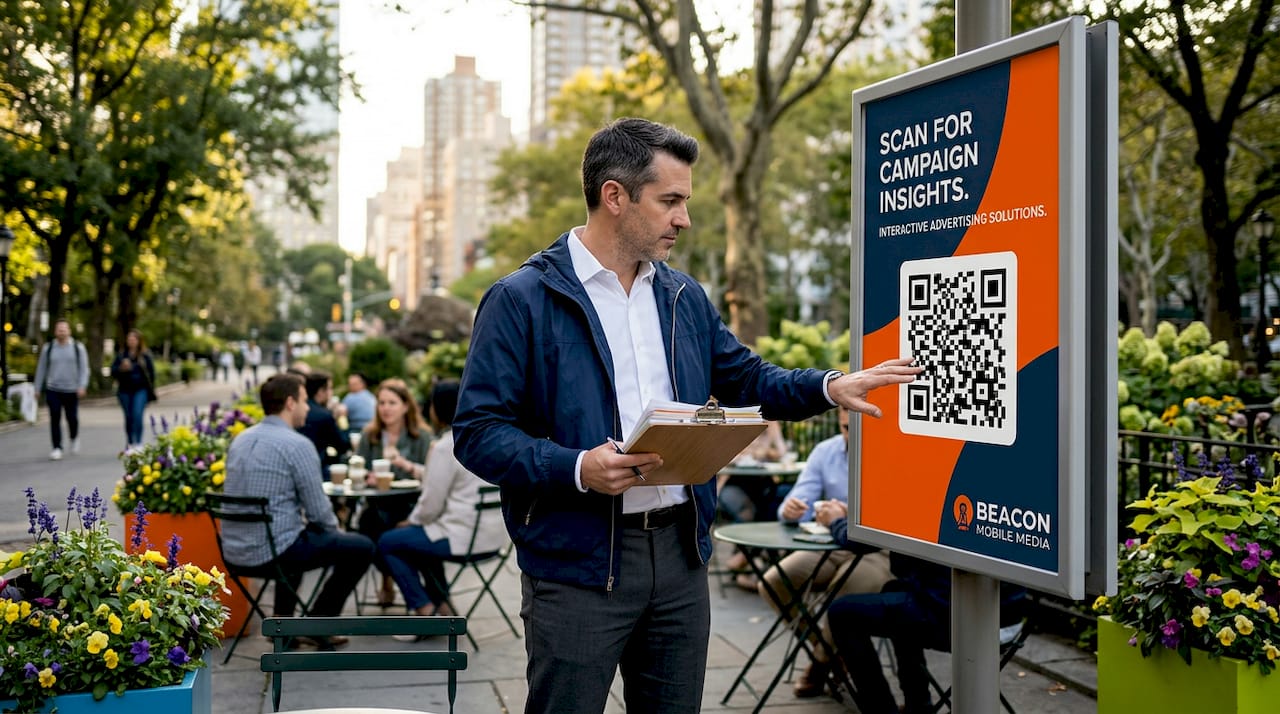
Smart QR codes with prominent placement and a clear incentive raise scan rates faster than any other single tactic. Static QR codes give you no redirect flexibility and no analytics. Smart codes let you A/B test destinations, update the landing page without reprinting, and track scan-level data including time, location, and device.
Practical placement and design rules:
- Minimum print size scaled appropriately for viewing distance on mobile billboards
- High contrast: dark module on white or light background, never reversed
- Include a three-to-five word CTA directly above or below the code (“Scan for VIP access”)
- Avoid placing codes on curved surfaces or near reflective materials
Pro Tip: For outdoor QR placements on LED billboard trucks, print the QR at a sufficiently large size and test scan success from typical viewing distances before the vehicle goes live.
Incentive ideas that convert: exclusive content download, contest entry, instant discount, event schedule PDF, or a live product demo booking link.
Coordinate QR codes across mobile billboards, booth materials, and staff badges using a single master redirect URL per campaign. This keeps analytics consolidated and prevents attendees from landing on different pages depending on which touchpoint they scanned.
How do you handle consent and privacy without killing opt-in rates?
Short, transparent consent with an explicit marketing opt-in checkbox and a linked privacy notice is both required best practice and a trust signal that increases willingness to share data. Attendees who understand what they are agreeing to opt in at higher rates than those presented with buried legal language.
What to include on every capture form:
- A single opt-in checkbox: “I agree to receive marketing communications from [Brand]”
- A plain-language storage note: “Your information is stored securely and never sold”
- A linked privacy policy (opens in a new tab)
- Timestamp and source field captured server-side for your records
“Events generate first-party data you own outright. Registration, session interest, engagement, feedback, and networking signals — all consented, none rented from a browser.” — Samaaro, Events Are Your Strongest First-Party Data Source
Log every consent record with a timestamp, form version, and campaign source. For US-based programs, this log is your primary defense if a contact later disputes their opt-in. Keep records for at least three years as a practical baseline, and review your privacy policy annually against any new state-level privacy laws (California, Virginia, Colorado, and Texas all have active frameworks).
How do you map CRM fields and keep data clean across channels?
Configure field mapping and dedupe rules before the event, then sync leads in real time. Real-time integrated qualification consistently produces higher conversion from event lead to MQL and SQL than post-event manual exports.
| Source field | CRM field | Validation rule | Owner |
|---|---|---|---|
| form_email | Contact.Email | Format check, lowercase | Marketing ops |
| form_company | Account.Name | Autocomplete match | Marketing ops |
| utm_campaign | Lead.CampaignID | Required, alphanumeric | Campaign manager |
| qr_scan_id | Lead.TouchpointID | Unique per scan | Data engineer |
| consent_ts | Contact.ConsentDate | timestamp | Compliance |
Dedupe checklist:
- Match on email as primary key; use company + name as secondary
- Flag records with the same email from different sources for manual review
- Merge badge-scan and QR-scan records within 24 hours using the email key
- Mark the original source on every merged record for attribution integrity
Pro Tip: Create a “capture source” field in your CRM before the event. Populate it automatically from the UTM source parameter. This one field makes post-event attribution reporting dramatically faster.
Assign a named data quality owner. After the event, that person runs the cleanup: merges duplicates, fills missing required fields where possible, and archives records that failed validation.
How do you trace a QR scan on a mobile billboard back to revenue?
Instrument QR destinations and CRM records with campaign IDs and session UTM parameters so every scan traces back to the OOH exposure. Enterprise event data management connects those scan points to pipeline metrics and revenue dashboards.
Attribution flow:
Mobile billboard exposure → QR scan (UTM captured) → mobile form submit → CRM record created → nurture sequence triggered → MQL scored → SQL routed to sales → opportunity created → revenue closed
Metrics to track in your dashboard:
- QR scan rate (scans per impression estimate)
- Form completion rate (submissions per scan)
- Opt-in rate (consented records per submission)
- Conversion to MQL (MQLs per opt-in)
- Time to first sales touch
- Pipeline influence (opportunities touched by event campaign)
For retargeting and geofencing workflows, push the device-level audience from QR scan events into your digital ad platform within 24 hours. This creates a retargeting pool of people who physically engaged with the billboard and then scanned, a much warmer signal than a standard impression audience.
What QA tests must you run before and during the event?
Test every capture path end-to-end before the event and run a live smoke test immediately before doors open. A single broken redirect can silently drop every lead from a session.
- Scan each QR code from three different devices (iOS, Android, older Android)
- Submit a test form and confirm the CRM record appears within 60 seconds
- Verify consent timestamp is logged server-side
- Confirm UTM parameters pass through to the CRM record
- Check proof-of-posting upload path: GPS photo logs to the correct campaign folder
- Test the fallback: if the primary form fails, does the offline capture app activate?
Fallback options to prepare:
- Offline form (cached mobile page that syncs when connectivity returns)
- Manual capture app with CSV export for post-event upload
- Backup QR code pointing to a secondary landing page on a different server
Proof-of-posting verification requires a named person on-site who checks GPS-tagged photos every two hours and confirms route logs match the planned schedule. This documentation supports sponsor reporting and attribution audits.
How do you turn scans into sales-qualified leads after the event?
Follow up within 24 hours and route hot leads immediately to sales. Enriching and syncing lead data quickly produces higher ROI from event campaigns than any post-event delay.
- 0–24 hours: Automated welcome email with the promised value asset; hot leads (score above threshold) routed to sales rep same day
- Days 2–3: Value-add email (case study, relevant resource, session recap)
- Days 7–10: Direct CTA email (demo request, consultation booking, product trial)
Simple scoring model:
- Scan + form completion: 10 points
- Job title matches ICP: 15 points
- Company size matches ICP: 10 points
- Opened welcome email: 5 points
- Clicked any link: 10 points
- Hot threshold: 35+ points, route to sales immediately
Routing rules:
- Hot leads (35+): assign to regional sales rep, notify within one hour
- Warm leads (15–34): enter automated nurture sequence
- Cold leads (under 15): add to general newsletter list, re-score after 30 days
Beacon-ads in action: end-to-end capture, sync, and attribution
Beacon Mobile Media’s QR-first capture connects mobile billboard exposure to real-time CRM sync and digital retargeting in a single workflow. Here is how the data flow works in practice for a conference or trade show activation:
| Stage | Action | Output |
|---|---|---|
| Pre-event setup | Smart QR codes configured with UTM parameters and CRM field mapping | Campaign-tagged QR assets ready |
| Live activation | LED billboard truck routes near venue; attendees scan QR | Scan events logged with timestamp and location |
| Form submission | 3–5 field mobile form submitted | CRM record created in real time |
| Retargeting trigger | Scan audience pushed to digital ad platform | Warm retargeting pool active within 24 hours |
| Proof-of-posting | GPS-tagged photos and route logs captured | Sponsor-ready documentation |
| Attribution report | Scan → MQL → opportunity tracked in dashboard | Pipeline influence reported |
Pro Tip: Request proof-of-posting documentation from your mobile OOH provider before the campaign ends. GPS photos and route logs are the only way to audit whether the billboard actually ran where and when it was scheduled.
Beacon-ads provides smart QR codes as part of every mobile billboard campaign, with scan analytics feeding directly into campaign dashboards. The retargeting and geofencing layer means a person who scans a billboard near a conference venue can be served a follow-up digital ad within hours.
Key Takeaways
The most effective event data capture combines mobile-first QR forms with 3–5 essential fields, real-time CRM sync, transparent consent, and a 24-hour follow-up workflow.
| Point | Details |
|---|---|
| Limit form fields | Collect 3–5 essentials at first touch; use progressive profiling for second-tier data. |
| Sync in real time | Configure CRM field mapping before the event and sync leads within 24 hours to preserve lead quality. |
| Consent is a trust signal | An explicit opt-in checkbox and linked privacy notice increases opt-in rates and keeps records usable. |
| QA every path | Test QR-to-CRM end-to-end 48 hours out and run a live smoke test before doors open. |
| Beacon-ads | Beacon Mobile Media pairs LED mobile billboard campaigns with smart QR capture, geofencing, and proof-of-posting for full attribution. |
Why the data window at events is shorter than most teams think
Most marketing teams treat event data capture as a logistics problem. It is actually a timing problem. The window between a person scanning a QR code on a mobile billboard and that person being genuinely receptive to follow-up is measured in hours, not days. Once they leave the venue and re-enter their normal routine, the brand interaction fades fast.
The teams that get this right are not necessarily the ones with the most sophisticated tech stack. They are the ones who made a decision before the event that the data would land somewhere usable, not just somewhere archived. A CRM integration that took two hours to configure is worth more than a post-event spreadsheet that took two days to clean. The same logic applies to consent: a short, honest opt-in checkbox converts better than a wall of legal text, and it produces records you can actually use.
Where most teams should concentrate resources: the 48-hour window before the event (setup and QA) and the 24-hour window after (follow-up and routing). Everything in between is execution.
Beacon-ads runs the full capture stack for mobile OOH campaigns
If you are running a conference or trade show activation and need QR capture, geofencing, and attribution built into the same campaign, Beacon Mobile Media handles the full stack. LED billboard trucks and wrapped rideshare vehicles route near your venue, smart QR codes capture scan-level data, and the retargeting layer pushes warm audiences to digital platforms within 24 hours.

Every campaign includes proof-of-posting documentation (GPS-tagged photos, route logs) and a reporting dashboard that connects scans to pipeline. For teams targeting conferences and trade shows with mobile billboards, Beacon-ads operates across all 50 states with no long-term contract required. Request a campaign quote at beacon-ads.com and get a route and pricing proposal within 24 hours.
Useful sources and further reading
- First-Party Data Capture at Events: A Complete Guide — Campaign Media
- Event Data Management: The Complete Enterprise Guide — Bizzabo
- The Best Way to Capture Leads at Events With a Lead Capture App — Bizzabo
- First-Party Data for Events: Why It Matters in 2026 — Expo Pass
- Events Are Your Strongest First-Party Data Source — Samaaro
- How to Effectively Collect Data From Your Event — Ticketpass
- Smart QR Codes: Boost Campaigns With Data and Engagement — Beacon-ads
- Smart Data Capture: The Real Role in Better OOH Results — Beacon-ads
- QR Code Engagement Guide — Beacon-ads