Secure QR campaigns rest on four controls: branded short domains with strict redirect rules, locked-down access to whoever can edit those redirects, minimal data capture at the scan layer, and active monitoring with a kill switch ready to go. Skip any one of these and you’re exposed to link hijacking, broken attribution, or a compliance headache you didn’t see coming. Every section below breaks down how to build each control into a campaign that still performs.
TL;DR:
- Using a branded short domain with clear, non-generic slugs prevents spoofing and makes suspicious scans easier for users to verify manually.
- Strict access controls, including role-based permissions, two-factor authentication, and audit logs, are essential to prevent unauthorized redirect modifications mid-campaign.
- Applying UTMs at the redirect stage and building a custom GA4 channel group ensures accurate attribution and prevents scans from registering as direct or untracked traffic.
- Generating per-placement links and training staff to detect tampered codes helps isolate compromised units without risking entire campaigns.
- Encrypting sensitive code payloads and transfer channels protects high-value codes from leaks and fraudulent use once the campaign involves personal or financial data.
Table of Contents
- What Does QR Code Security Actually Mean for Marketers?
- Secure Link and Redirect Setup: Domains, Allow-Lists, and Expiration
- Who Should Have Access to Your Redirect Platform?
- How Should You Handle Scan Data and Privacy Compliance?
- How Do You Keep QR Scans From Showing Up as Direct Traffic?
- How Do You Prevent Tampering With Printed QR Placements?
- How Do You Catch and Respond to a Compromised QR Code?
- Beacon Mobile Media: Applied Controls in QR-Enabled OOH Campaigns
- What Encryption Options Protect Sensitive QR Code Content?
- How Do You Train Teams and Customers to Spot Phishing Risks?
- Where Does Multi-Factor Authentication Fit Into QR Campaign Security?
- How Often Should You Audit and Test Your QR Platform?
- The Perspective That’s Missing From Most QR Security Advice
- Get a Security-First Review of Your Next QR Campaign
- Sources
What Does QR Code Security Actually Mean for Marketers?
QR code security, in a campaign context, isn’t about phones getting hacked when someone scans a poster. It’s about controlling what happens between the scan and the landing page, and making sure the data that flows through that moment stays accurate, private, and attributable to the right campaign. That distinction matters because most advice online is written for consumers worried about malicious codes, not for the marketer who owns the redirect infrastructure.
The real risks in this world are different: a competitor or bad actor swapping a destination URL, an intern with too much access changing a live link mid-campaign, UTM parameters getting stripped by a sloppy redirect chain, or scan data sitting unencrypted on a server nobody’s monitoring. QR code authentication in this sense means verifying that the redirect a code points to is the one you approved, and that only authorized people can change it.
Handled well, QR code security is a workflow problem, not a cryptography problem. It touches domain management, access control, data governance, and campaign operations, which is why the checklist below covers infrastructure choices as much as it covers technical settings.
Secure Link and Redirect Setup: Domains, Allow-Lists, and Expiration
The redirect layer is where most QR security actually happens, since the code itself is just a static image pointing at a URL you control. Get that URL layer right and you’ve closed off the majority of real-world risk.
- Use a branded short domain with readable slugs (think
go.yourbrand.com/summer-promo) instead of a generic shortener string. Recognizable domains are harder to spoof convincingly and easier for a suspicious scanner to verify by eye, a point made clearly in guidance on building quish-proof short links for offline campaigns. - Allow-list the destination domains your redirect platform can send traffic to, and reject open redirect parameters that let anyone pass an arbitrary URL through your trusted domain.
- Set a start and end date on every campaign link, and generate separate links per physical placement so one compromised unit doesn’t take down the whole campaign.
- Avoid stacking redirects. One clean, server-side hop to the final destination is faster and far less likely to fail or get intercepted than a chain of three or four redirects, a maintenance issue covered in depth in guides on redirect management without reprinting.
- For payment pages or file downloads, add an interstitial screen showing your brand, the destination, and a clear call to action before the final jump.
Pro Tip: Print the branded short URL beneath every QR code in small text. If a scan looks off, a wary customer can type the link manually and verify it lands where it should — a fallback that costs you nothing and builds real trust.
Who Should Have Access to Your Redirect Platform?
Access control is the part of QR code security most marketing teams skip, usually because one person “just handles the QR stuff.” That’s exactly the setup that breaks down when someone leaves the company or a link gets edited by mistake mid-campaign.
- Split duties across creation, approval, and publishing. The person who builds a redirect shouldn’t be the same person who pushes it live without a second set of eyes.
- Turn on two-factor authentication for every account with redirect access, and centralize logins through SSO wherever your platform supports it.
- Keep immutable audit logs that record who changed a destination, when, and from what device or IP address.
- Set a review cadence: monthly checks for active promotions, quarterly for evergreen assets, aligning with the maintenance rhythm recommended for ongoing redirect upkeep.
- For code packs shared with print vendors or agencies, encrypt the transfer and restrict downloads to whitelisted IP addresses.
Pro Tip: Treat your QR redirect dashboard like a CMS, not a bookmarking tool. If it doesn’t support role-based permissions, that’s a real gap, not a minor inconvenience.
How Should You Handle Scan Data and Privacy Compliance?
Every scan generates data, and how much of it you keep determines your exposure if something goes wrong. The safest posture is to capture only what the campaign actually needs.
- Log minimal scan metadata at the redirect layer: timestamp, an anonymized IP prefix for rough geography, and device or OS type. Skip anything that identifies an individual unless you have a specific reason to collect it.
- Define separate retention windows for raw scan logs versus aggregated reporting exports, and purge raw logs on a fixed schedule rather than letting them accumulate indefinitely.
- Before adding a scanner to an identifiable retargeting audience, get explicit consent, and document that consent flow so you can show it if asked.
- Vet any third-party redirect or QR platform on its data processing practices before you commit a campaign to it. High-value deployments, like prize claims or FMCG promotions with real customer data behind the scan, need the tighter lifecycle protections outlined in this QR data leak prevention playbook.
If you’re running events where scans double as lead capture, our guide on data capture tactics for event organizers walks through consent flows in more detail.
How Do You Keep QR Scans From Showing Up as Direct Traffic?
This is the problem that quietly wrecks QR attribution: scans land in GA4 as “Direct” or “Unassigned” because UTM parameters either weren’t applied consistently or got stripped somewhere in the redirect chain.
- Apply UTMs at the redirect layer, not baked into the static code itself. A static QR code with hardcoded UTMs can never be corrected once it’s printed.
- Use a consistent structure:
utm_sourcefor the placement type,utm_medium=qrheld constant across every campaign,utm_campaignfor the specific promotion, andutm_contentfor the individual placement ID. - Build a custom GA4 channel group that explicitly maps
qras a medium, so scans get classified correctly instead of falling into a generic bucket, a fix detailed in guidance on scans showing as Direct in GA4. - Fire a lightweight
qr_scanevent and your Meta pixel at the moment of redirect, not after the landing page loads, which keeps scanners eligible for retargeting even if they bounce, an approach explained in this QR code GA4 and Meta pixel guide. - Track your scan-to-session ratio. A gap usually traces back to a slow landing page, blocked JavaScript, or a redirect hop that strips query parameters along the way.
Consistency in your utm_medium naming beats clever campaign-specific labels every time. If half your team writes qr and the other half writes QRCode or qr-scan, GA4 will split what should be one clean channel into three fragmented ones. Our breakdown on precise reporting for ad campaigns covers scan-to-session diagnostics in more depth.
How Do You Prevent Tampering With Printed QR Placements?
Physical placements are the part of QR security that’s easiest to overlook because it feels like a design problem, not a security one. It’s both.
- Frame every code in consistent brand styling and print the short branded URL beneath it for manual entry, matching the recognition benefit covered earlier for branded short domains.
- Generate per-placement links so a single compromised or damaged unit can be disabled without touching the rest of the campaign.
- Follow print size and contrast specifications for your placement distance. A code too small to scan reliably invites frustrated users to try workarounds you didn’t design.
- Train field staff running high-traffic placements, like conference and trade show activations, to visually inspect codes regularly and swap out anything that looks tampered with or peeling.
How Do You Catch and Respond to a Compromised QR Code?
Detection speed determines how much damage a hijacked route actually does. Most incidents aren’t sophisticated attacks; they’re a missed edit alert or a scan spike nobody noticed for two days.
- Monitor for destination changes, sudden scan volume spikes, geographic anomalies, and a rising rate of failed trust checks on redirects.
- Set automated alerts for any destination edit or blocked redirect attempt, routed to both the campaign owner and a security contact.
- Build a kill switch that redirects disabled codes to a neutral page explaining the outage, with a support contact listed, rather than a dead link or error page.
- After any incident, pull the audit logs, map which placements were affected, pause related campaigns, and notify anyone whose data might have been exposed.
Pro Tip: Test your kill switch before you need it. A kill switch nobody has ever triggered in a dry run usually fails the first time it’s actually needed.
Beacon Mobile Media: Applied Controls in QR-Enabled OOH Campaigns
Running QR codes across a national footprint of LED billboard trucks and wrapped rideshare vehicles means every placement is a potential point of exposure, so the controls above aren’t theoretical for us.
- We assign per-route short domains and route-specific slugs, then generate per-placement links so a single tampered code never puts an entire campaign at risk.
- Redirect tools run behind role-based access and two-factor authentication, and we pair that with photo and GPS proof-of-posting so every placement is independently verifiable.
- Scan events feed into retargeting funnels using anonymized metadata, with consent honored at every step rather than assumed.
None of this replaces good campaign strategy. It’s the infrastructure that keeps your attribution data trustworthy once the strategy is running in the field.
What Encryption Options Protect Sensitive QR Code Content?
Most marketing QR codes just point to a public landing page, which means there’s nothing to encrypt in the code itself. But once a code carries something sensitive, a prize claim ID, a personalized discount tied to a customer record, or a link into a gated portal, encryption becomes relevant at two different points.
The first is the code payload itself. Rather than encoding a raw destination URL with an embedded identifier anyone could read or guess, route the code through a token that maps to the real destination on your server. That token approach means someone scanning or photographing the code sees an opaque string, not a predictable pattern they could manipulate to access someone else’s data.
The second is the transfer and storage layer. Code packs generated for a promotion, especially ones tied to prize claims or FMCG giveaways, should move between your team and any print vendor through encrypted channels, never a plain spreadsheet emailed around. Automatic expiration of unused codes closes the door on packs that leak or get set aside and forgotten. This full lifecycle approach, covering encrypted transfer, access authorization, and expiration, is exactly what’s recommended for high-value deployments where a leaked code pack could mean real fraud exposure, not just a marketing embarrassment.
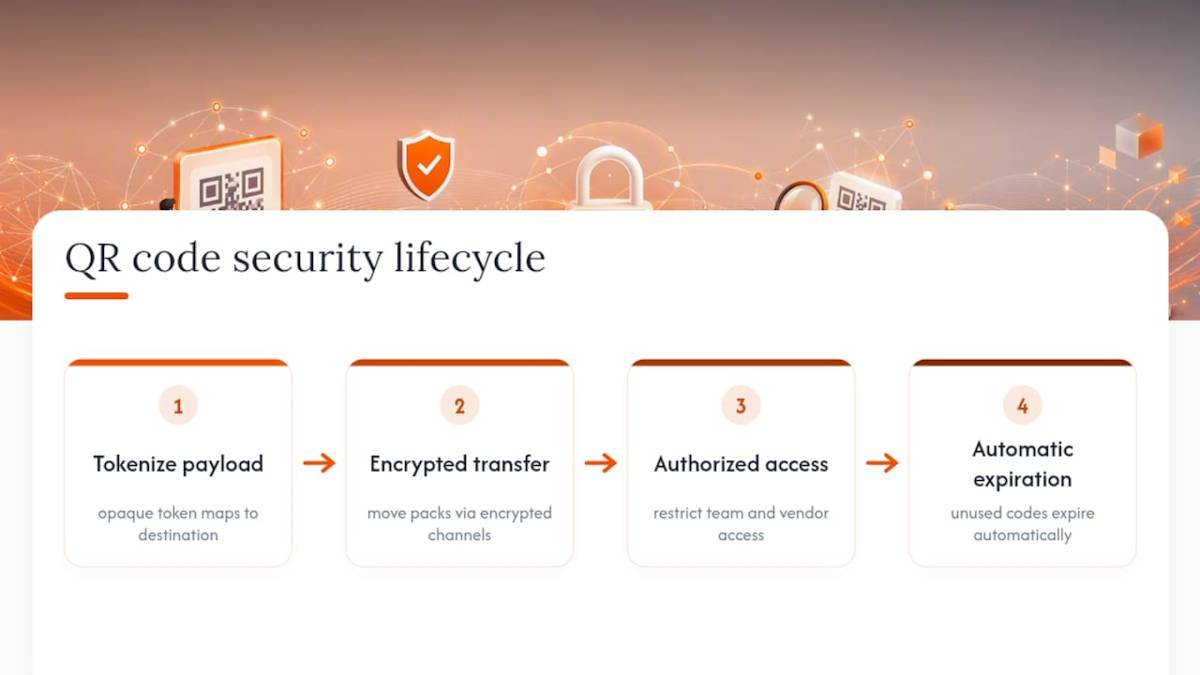
If your campaign never handles anything more sensitive than a link to a landing page, this layer matters less. The moment a code becomes a key to something valuable, treat the token and its distribution with the same care you’d give a coupon code or a promo credential.
How Do You Train Teams and Customers to Spot Phishing Risks?
The biggest vulnerability in most QR programs isn’t the technology. It’s a lack of shared understanding about what a legitimate scan should look like, both internally and for the people scanning your codes.
Internally, make sure everyone touching the campaign, from the designer to the field team, knows the branded domain your codes should always point to. If a proof comes back with a link that doesn’t match, that’s a red flag worth raising before printing, not after.
Externally, the printed fallback URL beneath every code does double duty here. It gives cautious customers a way to verify the destination manually, and it signals that your brand takes the scan experience seriously enough to make it checkable. Consider a short line of copy near high-value codes, like payment or download triggers, that tells people what to expect before they scan: “Scan to claim your offer at [yourbrand].com.” That kind of explicit framing makes an altered or substituted code stand out immediately, because it won’t match what the customer was told to expect.
Field staff deserve specific training too, not just a general security reminder. Show them what a tampered code actually looks like, an overlay sticker, a peeling edge, a code positioned oddly on a placement, and give them clear authority to pull or cover a suspect code on the spot rather than waiting for approval.

Where Does Multi-Factor Authentication Fit Into QR Campaign Security?
Multi-factor authentication doesn’t protect the QR code itself. It protects everything upstream, the redirect platform, the campaign management dashboard, and any system that can change where a code points once it’s already printed and in the field.
That distinction matters because a printed code is essentially permanent for the length of the campaign. The only thing that can go wrong after printing is a change to its destination, which means account security on your redirect platform is the actual control surface, not the code. Anyone with login access to that platform can redirect thousands of printed codes to a new destination in seconds, which is precisely why MFA belongs on every account with edit rights, not just admin accounts.
Extend the same requirement to any third-party platform you rely on for QR generation, hosting, or analytics integration. If a vendor doesn’t support MFA on accounts with write access to your redirect data, that’s a real gap in your security posture, regardless of how polished their dashboard looks. Pair MFA with the role-based access structure covered earlier: authentication confirms who someone is, but role restrictions confirm what they’re allowed to touch once they’re in.
How Often Should You Audit and Test Your QR Platform?
A QR redirect platform that worked securely at launch doesn’t stay that way automatically. New team members get added, integrations change, and vendors update their own systems in ways that can quietly open gaps.
Build a recurring review into your operations rather than treating security as a one-time setup task. That review should check who currently has access against who should have access, confirm audit logs are actually capturing changes (not just configured to), and verify that expired campaign links have in fact stopped resolving. Pair this with the same scheduled maintenance cadence recommended for redirect inventories generally, monthly for active promotions and quarterly for evergreen assets.
For larger programs or any campaign touching sensitive data, a periodic penetration test on the redirect platform is worth the investment. That means having someone actively try to bypass allow-lists, exploit open redirect parameters, or access admin functions without proper credentials. Most redirect platforms marketed to advertisers weren’t built with adversarial testing in mind, so this step often surfaces gaps that standard usage never would.
The Perspective That’s Missing From Most QR Security Advice
Most guidance on this topic treats QR security like an IT checklist bolted onto a marketing campaign, which misses the point entirely. The actual risk isn’t a hacker intercepting a scan. It’s a marketing team losing control of its own redirect infrastructure through neglect: nobody owns the link, nobody’s watching for edits, and by the time someone notices, the campaign’s attribution data is garbage and there’s no way to tell if that’s from a technical glitch or something worse.
The conventional advice fixates on encryption and phishing awareness, which matter, but underweights the boring stuff that actually causes most incidents: unmanaged access, missing expiration dates, and UTM inconsistency that silently erases weeks of attribution data. Fix those four things first. Encryption and audits matter more for high-stakes campaigns handling real customer or financial data, but for the typical brand promotion, the redirect layer and who can touch it are where the real exposure lives.
If you take one thing from this checklist, make it ownership. Every printed QR code needs a named owner who gets the alert when something changes, not a shared login three people forgot they have access to.
— Scott
Get a Security-First Review of Your Next QR Campaign
Beacon-ads is the operational alternative to running QR campaigns on a generic shortener and hoping nothing goes wrong. Every QR-enabled placement we deploy across our LED mobile billboard trucks and wrapped rideshare fleet runs through branded short domains, per-placement links, and role-based access control, backed by photo and GPS proof-of-posting on every unit and full attribution analytics tying scans back to campaign performance.

That combination means you’re not choosing between security and measurement. You get both, built into the same infrastructure that’s already running your out-of-home placements nationwide. If you’re planning a campaign that leans on QR codes for lead capture or retargeting, request a security-first campaign review to see exactly how your redirect setup, data capture, and reporting would work before a single truck hits the road. Start by exploring our guide to out-of-home advertising formats to see how the pieces fit together for your next campaign.
Sources
- Stop Letting Your QR Codes Get Hijacked: How To Build ‘Quish‑Proof’ Short Links For Offline Campaigns – Redirectmy
- QR Code Google Analytics & Meta Pixel Guide | QRTRAC
- QR Code Redirect Management Without Reprinting
- How to Stop QR Code Data Leaks in FMCG Marketing: A Technical playbook – BestHub
- QR Code Tracking in GA4: Fix Scans Showing as Direct